

16 Nov 2024
Post by Midwest Money Mentor
You likely hear/see financial educators or finance guru’s say things like, “Just go open a brokerage account online”, or “Make sure you own low cost Index Funds”. But, us financial educators who think we are being helpful, often neglect to notice that many people don’t know how the heck to do those steps in the first place (or understand what we are really saying). Most American’s have not opened investment accounts, or have just used (if anything) the accounts provided to them through their employer’s retirement plan options (401k’s, 403b’s, Simple IRA’s, and so on). So, going off on their own to open their own accounts, on a website or platform they have never used or seen, can seem a little daunting and quite confusing.
This blog post is here to provide a step by step guide so you do not have to do anything on your own. You can, literally, just follow the steps in these blog posts and not worry about trying to navigate the unknown (likely for multiple wasted hours). Just read on, go one step at a time, and use the time you save to do something more enjoyable than frustratingly trying to understand new technology. Just for the record, I hate trying to figure out new technology. I am under the age group of a millennial, but my patience for figuring out technology is measured in nanoseconds.
For this particular post, we are going through how to find mutual funds that fit Midwest Money Mentor’s teachings of very low cost, passive and diversified investing. This always sounds easy to people who actively look for these funds on a regular basis. But for you, the first-timer, narrowing down to what you want from the 10’s of thousands of options can seem a bit much. We will do it on here with a few basic steps.
Step Number 1 – Sign in to your Fidelity Account. You should have gone through setting up your Fidelity account in Part 1 of this series. If you have not set up your account, stop and take a moment to do so and go back to the previous post. If you need the link, here you go- https://www.fidelity.com/1
Once at Fidelity.com,
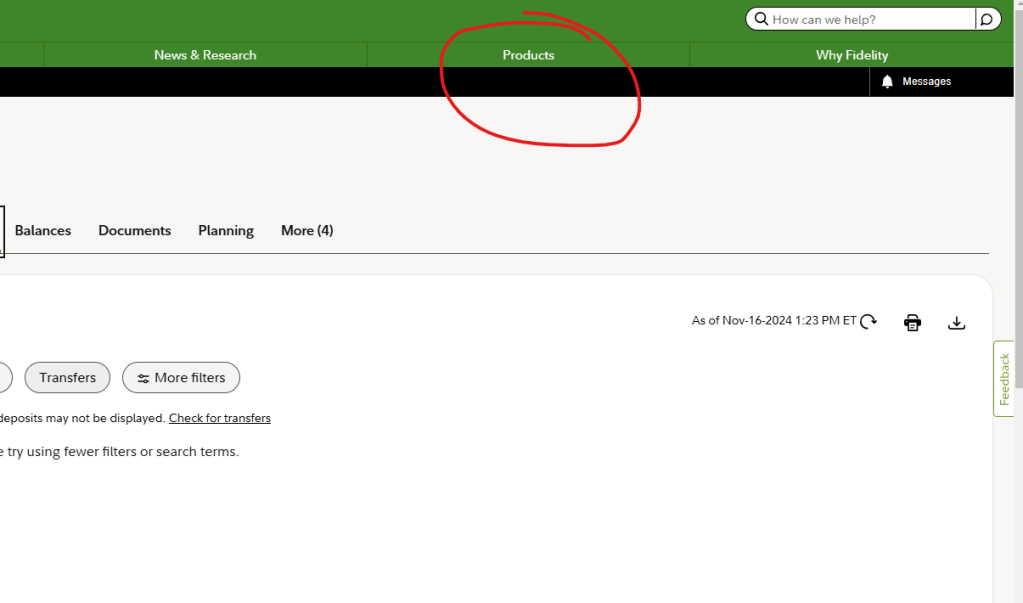
Step Number 2 – We need to go to the products area to find the funds we want. When you sign into your Fidelity Account, look in the top right and hover over the “Products” tab and click on “Mutual Funds”.
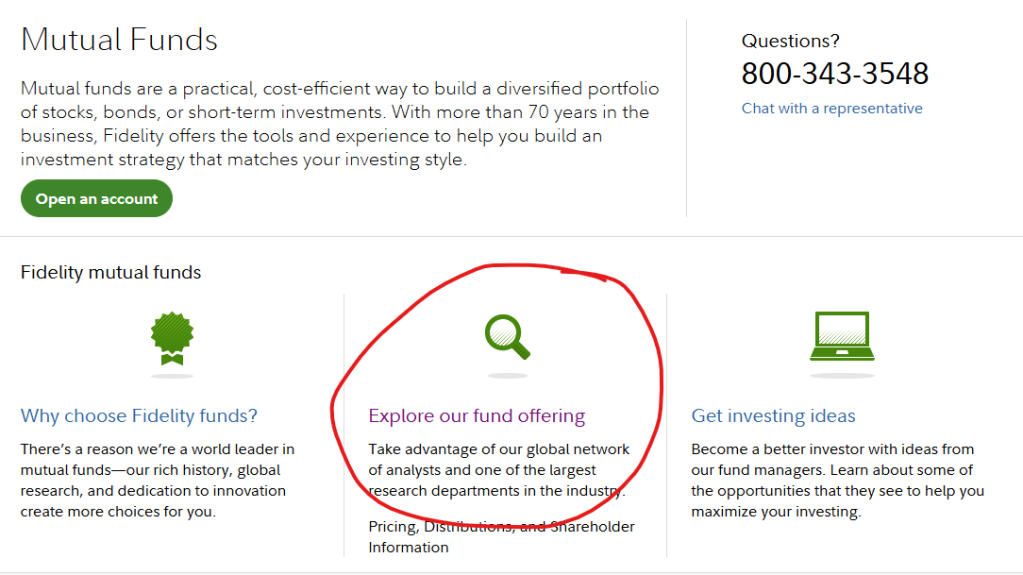
Step Number 3– Once you are in the “Mutual Funds” section, we want to click on “Explore Our Fund Offering”. This will bring you to a Fidelity page with tons of options. We will narrow down the options we want systematically to show you how to search, in detail.
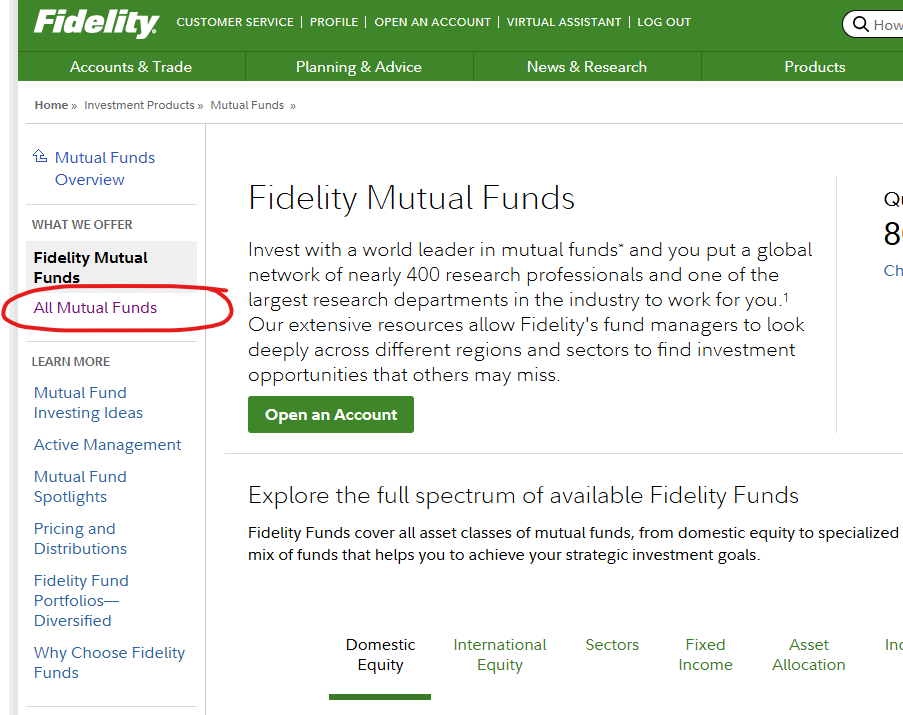
Step Number 4 – As mentioned in step 3, you will see many different links to many different options. I want to show you the systematic and detailed approach to narrowing down what you want, in the event you want to expand your directions in the future. So, click on “All Mutual Funds”.
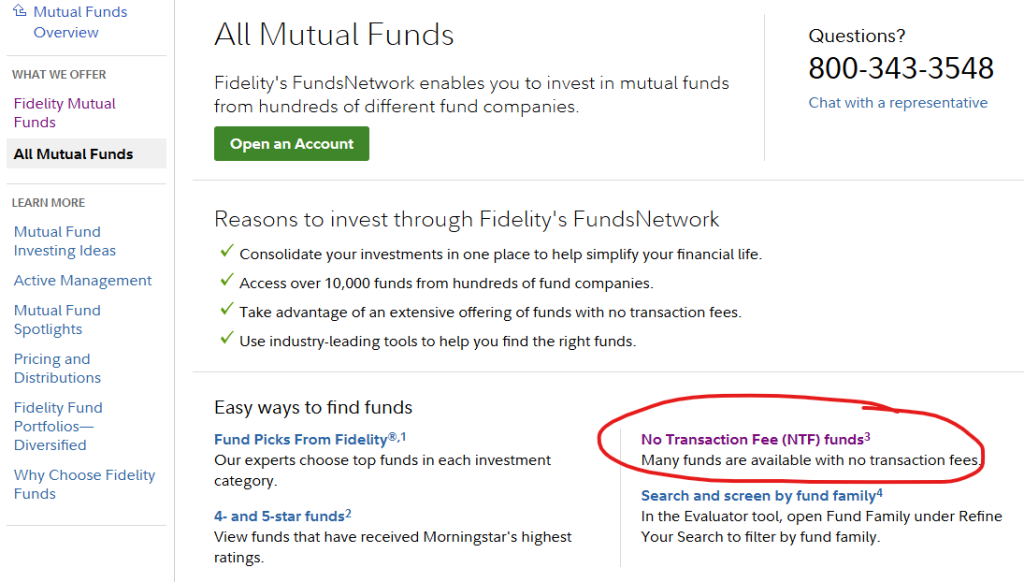
Step Number 5 – Once we are in the “All Mutual Funds” page, we are going to narrow down our search by costs, initially. As I mentioned in our post on Mutual Fund fees, there can be a huge variety of potential costs that you could get charged for with your mutual fund ownership, to the tune of hundreds of thousands of dollars over your investing lifetime. We want to avoid this crazy amount of costs in every way possible. The first step is by working with NTF funds, which simply “No Transaction Fee” funds. Transaction fees are fees that you get charged up-front for investing your money in the funds. Simply using funds that do not charge transaction fees can save us tens-of-thousands (depending the total amount we invest over time, of course). So, click the “No Transaction Fee (NTF) Funds” button.
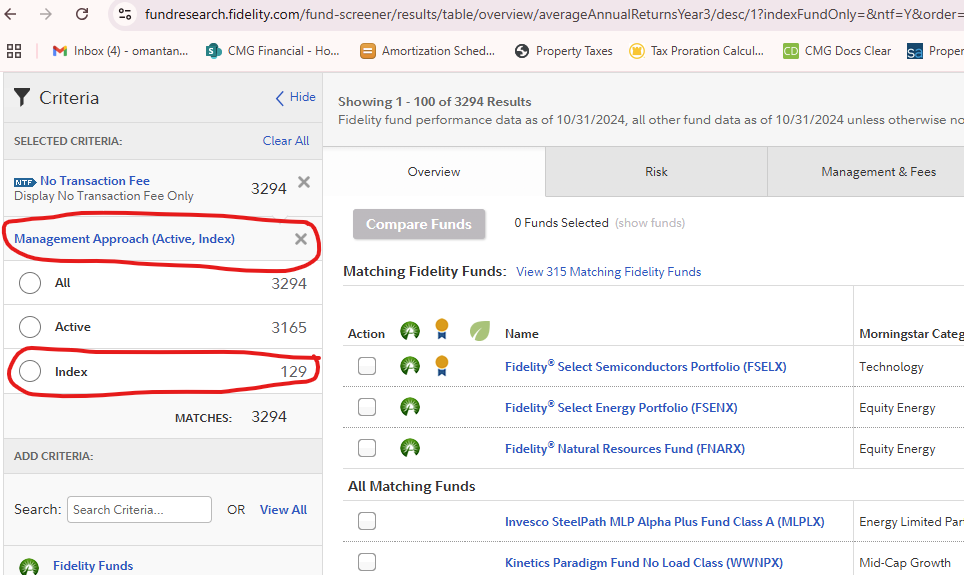
Step Number 6 – We will now be opened up to the page that supply’s all the fund options available (minus funds that charge transaction fees). If you look in the top left of the web page, you will see that there is now three thousand two hundred and ninety four mutual fund options to choose from (as of this post writing). This is obviously way more than anyone can review, so we are going to take some steps to narrow down the options to the funds we want to start with for our core investments. We are going to only show mutual funds for now, but many of you could benefit from looking at the similar ETF options, down the road. You would just click “Include ETFs” over on the top left, to have those funds included in your search. For now though, the first thing we want to narrow down is the “Management Approach”. I will not going into details on this topic a whole bunch here. You can reach our posts on fees and management approaches to get more info. What we are going to do is click “Management Approach (Active, Index)” on the upper left hand side of the web page, and when it drops down, select “Index”. This will provide us the index fund options, which are passive funds with lower fees. That narrows down the options to one hundred and twenty nine options, as of this post.
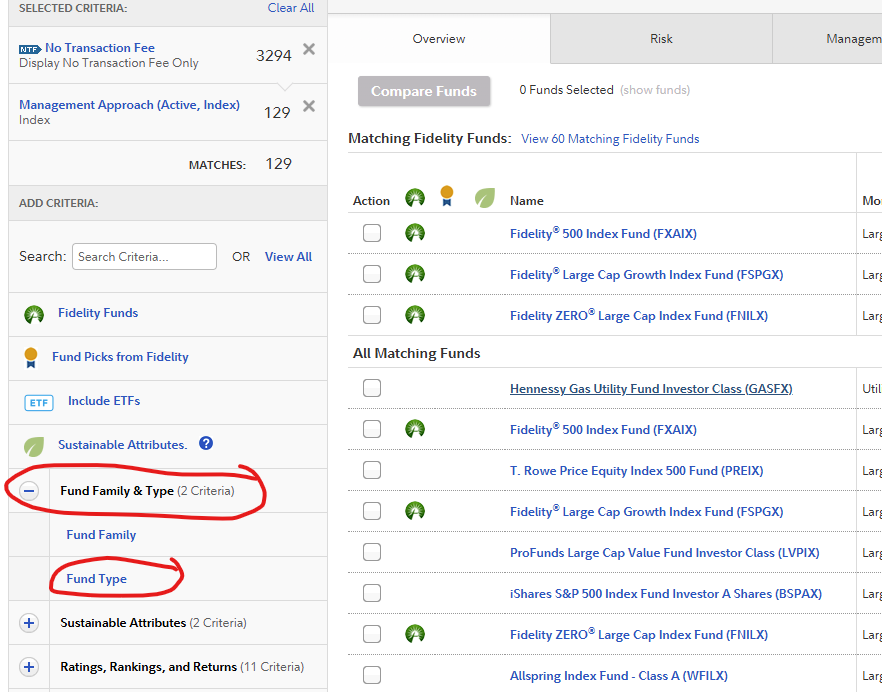
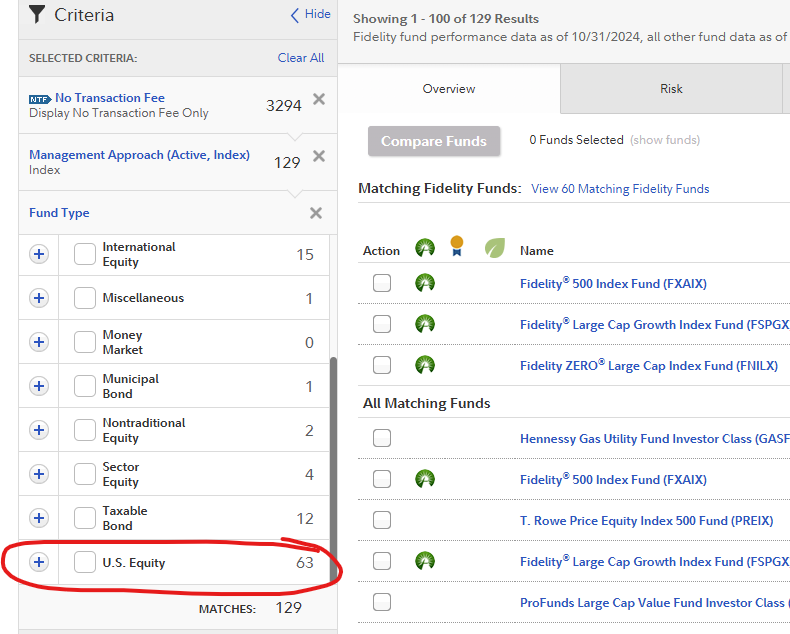
Step Number 7 – Next we are going to figure out what “Fund Type” we want to focus on. Normally one would start by focusing on “Equities”, which just mean funds that own stock, and then add in “Fixed Income”, or funds that own bonds, depending on the portfolio design you want to go with. We go through figuring out your portfolio design in other posts. For now, let’s just narrow down to stock funds that invest in companies in the United States to keep things simple (these are often the safest and most consistent of the equity investments due to the strength of the US economy, in the world). Click the “Fund & Family Type” drop down, and then select “Fund Type” and “U.S. Equity”.
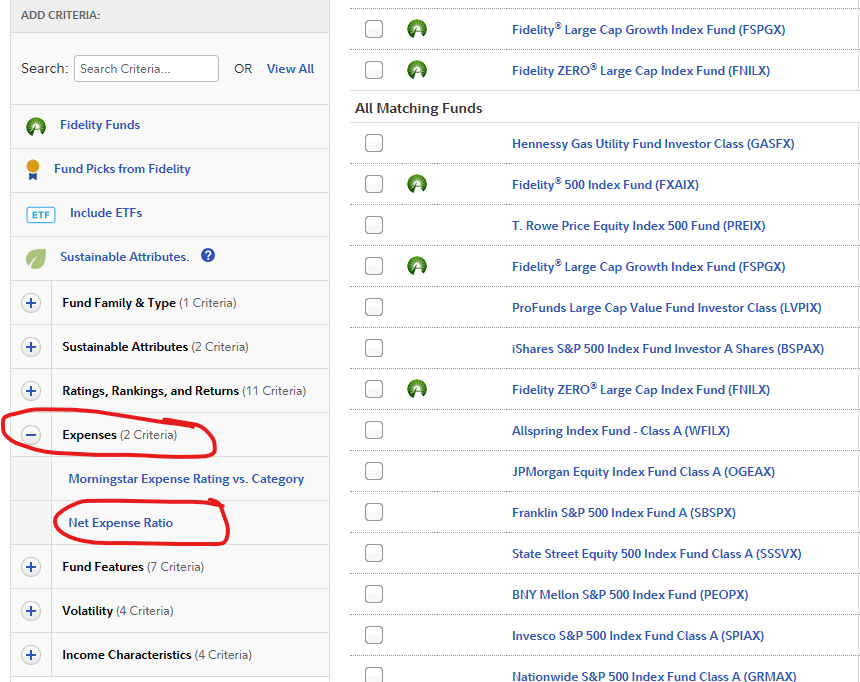
Step Number 8 – As we continue to narrow down our search to what funds we want, we next want to click on the “Expenses” drop down, and select “Net Expense Ratio”, and the expense ratio of “0.0% to 0.5%”. Again, expenses are one of the biggest investment returns destroyers out there, and we want to do everything we can to control those costs. So, selecting the lowest cost options helps keep more money for ourselves and our compounding returns. Once you select that, our options are narrowed down to thirty three options.

Step Number 9 – We are getting very close to the end of our narrowing down of options. The second to last and the last important choices we traditionally want to narrow down (in Midwest Money Mentor’s beliefs) comes from the drop down of “Fund Features”. If you click that drop down, you are given an array of options, the two we want to focus on are “Inception Date” and “Turnover Ratio”.

Once you click “Inception Date”, I traditionally recommend working with funds that have been around for quite some time. This can help lower risk a little bit by not jumping into funds that just started and do not have a long track record that can help us estimate anticipated returns. If a fund started last year, we do not know how it performed during Covid, the 2008 housing crash, and so on. I, personally, like to see the long-term ups and downs being calculated into the total performance. So, I choose to use funds that have been around for more than 10 years.

When you click on “Turnover Ratio”, this means how often funds are bought and sold (turned over) throughout the year within the fund. High turnover, and therefore high selling and buying within the fund, can lead to higher costs due to more taxes (from capital gains of stocks/bonds being sold in the fund) and more fees (from transaction fees for buying and selling the stocks/bonds). I, therefore, prefer to choose low turnover funds to increase the likelihood of my investments having the lowest costs.
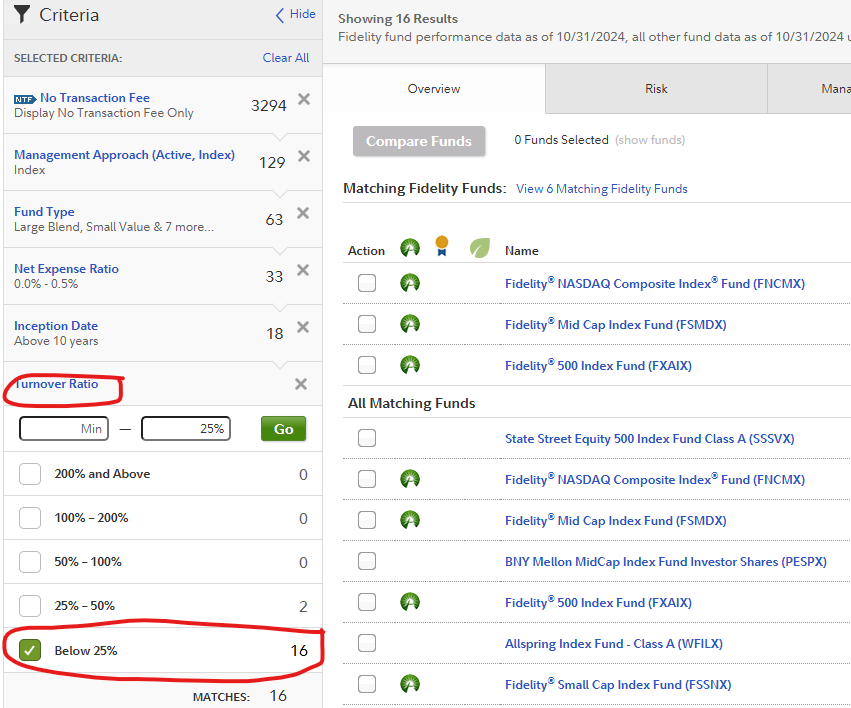
We are now narrowed down to the sixteen funds we may want to work with, which is considerably easier to review than over three thousand options. My recommendations from here, when you are starting out, is to select funds that give you fairly high 10 year to lifetime returns (not that this is the most important part), and are broad-based with their diversification (within this asset type you are looking at, which is US equities for this example).
Funds like the “Fidelity NASDAQ Composite Index (FNCMX)” and the “Fidelity Total Market Index Fund” are both broadly diversified (FNCMX has 2,846 companies the fund holds stock in and FSKAX has 3,848 companies the fund holds stock in, as of this blog post) and both have good long-term returns (not to mention the low costs, long history, and passive management we want). Where as, funds that are titled “Mid Cap”, “or Large Cap” are more narrowly invested into only middle-sized or large-sized companies. Not that this is bad, it just has a little less diversification and therefore a little more risk.
Once you select your fund of choice (none of these are really going to be a bad choice as we narrowed down the big criteria already, SO JUST PICK ONE AND DO NOT PROCRASTINATE!), you will do the same step with US “Taxable bond” funds under “Fund Type” (Step 7), and “International Equity” under “Fund Type”, if you wish to add those to your total “portfolio”. You would just deselect “U.S. Equity” in the “Fund Type” options so you no longer look at those.
Hopefully that information helps out tremendously and helps you get your funds selected and money ACTUALLY invested. Invest on.


0 Comments